
Machine learning: Exploratory data analysis and synthetic data generation
Published:
This project walks through the various stages of analysis involved in tackling a classification problem, from exploratory data analysis (EDA) to model selection. The outcome of this analytical pipeline is a model that predicts whether a person will pay a loan back or not.
The data set used here was obtained from the Predicting Loan Payback Kaggle competition. The data are used in accordance with the Apache 2.0 license and competition rules. The specific environment used for the entire project is available here.
This page covers EDA and data preparation for modelling. The packages used for this are shown below.
# set up
import pandas as pd
import kaggle
import matplotlib.pyplot as plt
import numpy as np
import matplotlib.ticker as mtick
from matplotlib.ticker import PercentFormatter
import seaborn as sns
Data import
The block below downloads data directly to a data directory using the Kaggle API. The data only needs downloading from Kaggle once, so the try except statement checks whether data files are present in the data directory already (e.g., when we do a re-run of the script).
Note that 2 files are downloaded from the API, but the only the train.csv file will be used in this project.
Show code
# upload data
try:
    # if already downloaded, just read csv
    data = pd.read_csv("data/train.csv")

except FileNotFoundError:
    # if downloading for the first time
    import os
    from kaggle.api.kaggle_api_extended import KaggleApi
    import zipfile

    # authenticate
    api = KaggleApi()
    api.authenticate()

    # download data
    # data directory
    data_dir = "./data/"
    # ensure directory exists
    os.makedirs(data_dir, exist_ok=True)

    api.competition_download_files(competition='playground-series-s5e11',
                                   path=data_dir)

    # unzip files
    with zipfile.ZipFile("data/playground-series-s5e11.zip", 'r') as zip_ref:
        zip_ref.extractall("data/")

    data = pd.read_csv("data/train.csv")
Exploratory data analysis (EDA)
This particular data set was created synthetically, so we wouldn’t expect common data quality issues such as missing values. You can validate that this is the case - by checking the number of non-null values (which is equal to the number of entries, or rows, in the data set).
# data exploration (train data)
data.columns.to_list()
data.info() # no missing values in any columns
<class 'pandas.core.frame.DataFrame'>
RangeIndex: 593994 entries, 0 to 593993
Data columns (total 13 columns):
 #   Column                Non-Null Count   Dtype
---  ------                --------------   -----
 0   id                    593994 non-null  int64
 1   annual_income         593994 non-null  float64
 2   debt_to_income_ratio  593994 non-null  float64
 3   credit_score          593994 non-null  int64
 4   loan_amount           593994 non-null  float64
 5   interest_rate         593994 non-null  float64
 6   gender                593994 non-null  object
 7   marital_status        593994 non-null  object
 8   education_level       593994 non-null  object
 9   employment_status     593994 non-null  object
 10  loan_purpose          593994 non-null  object
 11  grade_subgrade        593994 non-null  object
 12  loan_paid_back        593994 non-null  float64
dtypes: float64(5), int64(2), object(6)
memory usage: 58.9+ MB
Class balance
loan_paid_back has been coded as 0’s (non-payers) and 1’s (payers). Before we do any exploratory analysis on the predicting variables (or features), it’s useful to know whether the outcome is balanced or not. In this data set, the outcome is unbalanced: almost 80% of the sample paid their loan back.
Show code
# make frequency table of outcome
outcome_freq = data['loan_paid_back'].value_counts().reset_index()
outcome_freq.columns = ['loan_paid_back', 'count']
# calculate percentage
outcome_freq['percentage'] = 100*data['loan_paid_back'].value_counts(normalize=True).round(3).values
# relabel for plotting
outcome_freq['loan_paid_back'] = outcome_freq['loan_paid_back'].map({0: 'Non-payers', 1: 'Payers'})

# make stacked bar plot of outcome
outcome_freq.plot(x='loan_paid_back', y='count', kind='bar', stacked=True, color=['#008837', '#7b3294'], legend=False)
# make x-axis text horizontal
plt.xticks(rotation=0)
# format y-axis with commas
plt.gca().yaxis.set_major_formatter(mtick.StrMethodFormatter('{x:,.0f}'))
# add count labels on top of bars, with some space, formatting numbers with commas
for index, value in enumerate(outcome_freq['count']):
    # add 4000 to value to control positioning of numeric label
    plt.text(index, value + 4000, f"{value:,}", ha='center', fontweight='bold')
    # add percentage labels inside bars
    plt.text(index, value/2, f"{outcome_freq['percentage'][index]:.1f}%", ha='center', color='white', fontweight='bold')

# set y-axis label
plt.ylabel('Number of observations')
# remove x-axis label
plt.xlabel('')
plt.show()

Numeric features
Although synthetic, this data set has a mix of numeric and categorical variables, just like real-life data sets. We’ll start exploring numeric features of the data by checking their distribution with the describe() method. Note that before we do that, we drop the id variable as it has no utility for analysis because it’s a unique row identifier. Similarly, we exclude the outcome variable, as this step is concerned with features only.
# permanently remove id col
data.drop('id', inplace=True, axis=1)

# exploratory data analysis - numeric variables
# drop dependent variable (since it's been coded as 1 and 0)
data.describe().drop('loan_paid_back', axis=1)
| annual_income | debt_to_income_ratio | credit_score | loan_amount | interest_rate | |
|---|---|---|---|---|---|
| count | 593994.000000 | 593994.000000 | 593994.000000 | 593994.000000 | 593994.000000 |
| mean | 48212.202976 | 0.120696 | 680.916009 | 15020.297629 | 12.356345 |
| std | 26711.942078 | 0.068573 | 55.424956 | 6926.530568 | 2.008959 |
| min | 6002.430000 | 0.011000 | 395.000000 | 500.090000 | 3.200000 |
| 25% | 27934.400000 | 0.072000 | 646.000000 | 10279.620000 | 10.990000 |
| 50% | 46557.680000 | 0.096000 | 682.000000 | 15000.220000 | 12.370000 |
| 75% | 60981.320000 | 0.156000 | 719.000000 | 18858.580000 | 13.680000 |
| max | 393381.740000 | 0.627000 | 849.000000 | 48959.950000 | 20.990000 |
The table above already offers insights into the data. As expected from variables that describe financial information, we can tell, by looking at the standard deviations and range of values, that most of these variables have a right or left skew.
However, presenting a table like this to non-technical stakeholders might be overwhelming, so I’d argue it’s best to visualise this information, and compare the outcome groups (payers vs. non-payers) while we’re at it.
You can either use box plots or histograms to visualise the distribution of numeric variables. In my opinion, the choice of which to use might depend of which audience you’ll be presenting to. I would go for box plots if presenting to a non-technical audience, but use histograms with technical audiences.
Box plots
Below, I have:
- divided the data by outcome group
- selected numeric features
- looped through each feature
- graphed box plots using
matplotlib
Note: I have made the bars horizontal and made the whiskers represent minimum and maximum values within the corresponding outcome group. I think those choices improve readability for non-technical stakeholders.
Show code
# create df's by payback group
filter = data['loan_paid_back'] == 1
data_payers = data[filter]
filter = data['loan_paid_back'] == 0
data_non_payers = data[filter]

# visualisation of numeric variables
# define cols to loop through in plot
numeric_cols = data_payers.select_dtypes(
    include=np.number).columns.drop('loan_paid_back')
# determine grid size
num_cols = len(numeric_cols)
ncols = 2
nrows = int(np.ceil(num_cols/2)) # in case of single row/col

# define plot objects
fig, axes = plt.subplots(nrows, ncols, figsize=(13, 8))
axes = axes.flatten()

# make boxplots
for i, col in enumerate(numeric_cols):
    ax = axes[i]

    # create boxplot for col
    bp = ax.boxplot(
        [data_payers[col], data_non_payers[col]],
        labels=['Payers', 'Non-Payers'],
        # allow custom colours
        patch_artist=True,
        # horizontal orientation of bars
        vert=False,
        # make whiskers represent min and max values
        whis = (0, 100)
        )

    colours = ['#008837', '#7b3294']
    for patch, colour in zip(bp['boxes'], colours):
        patch.set_facecolor(colour)
        patch.set_alpha(0.7)

    for median in bp['medians']:
        median.set(color='black')

    ax.set_title(f"Distribution of {col} by outcome group")
    ax.get_xaxis().set_major_formatter(
        # custom format for large/small scales
        mtick.FuncFormatter(lambda x, p: format(x, ',.0f') if x >=1000 else
        # use commas for large scales, 1 decimal for small scales
                            format(x, '.1f'))
                            )

# hide unused subplots
for i in range(num_cols, len(axes)):
    axes[i].set_visible(False)

plt.tight_layout()
plt.show()

Histograms
I think these are a better fit for technical audiences, particularly if you’re discussing skewness or considering transformations to the data. I have chosen not to fill the inside of the histogram bars, given the overlaps observed between the distributions of payers and non-payers.
Show code
# alternatively, these variables can also be visualised as histograms
fig, axes = plt.subplots(nrows,ncols, figsize=(13, 8))
axes = axes.flatten()

for i, col in enumerate(numeric_cols):
    ax = axes[i]

    # create histograms for each group
    ax.hist(
        data_payers[col], bins=50,
        color='#008837',
        label='Payers',
        histtype = 'step'
        )

    ax.hist(
        data_non_payers[col], bins=20,
        color='#7b3294',
        label='Non-payers', histtype = 'step'
        )

    ax.set_title(f"Distribution of {col} by outcome group")
    ax.legend()
    ax.get_xaxis().set_major_formatter(
        # custom format for large/small scales
        mtick.FuncFormatter(lambda x, p: format(x, ',.0f') if x >=1000 else
        # use commas for large scales, 1 decimal for small scales
                            format(x, '.1f'))
                            )

#hide unused subplots
for i in range(num_cols, len(axes)):
    axes[i].set_visible(False)

plt.tight_layout()
plt.show()

Categorical features
You can explore categorical variables by generating breakdown tables for each outcome group and compare those breakdowns visually in a plot. Doing so can allow you to answer questions such as is the non-payer group made up of more unemployed people than the payer group?
We can make a function to produce frequency tables (counts and percentages) and another one to graph the percentage within the outcome groups who fall in every category, making it easier to compare across variables.
Show functions
# visualisation of categorical variables

# recode outcome variable for displaying tables and plots
recode_dict = {1:'Payers', 0:'Non-Payers'}
data['outcome'] =  data['loan_paid_back'].map(recode_dict)

# generate frequency tables by outcome group
def generate_freq_table(data, col_name):
    # frequencies of categorical vol by outcome
    count_table = pd.crosstab(data[col_name], data['outcome'])
    # reset index so categorical variable is not kept as index
    count_table = count_table.reset_index()
    # calculate percentages by outcome group
    percent_payers = (
        count_table['Payers']/count_table['Payers'].sum()*100).round(1)
    percent_non_payers = (
        count_table['Non-Payers']/count_table['Non-Payers'].sum()*100).round(1)
    count_table['perc_payers'] = percent_payers
    count_table['perc_non_payers'] = percent_non_payers
    # sort values by count of payers
    frequency_table = count_table.sort_values(by='Payers', ascending=False)
    return frequency_table

# function to plot frequencies by group
def plot_categorical_cols(freq_table, col_name):
    # drop count columns, as the plot is for percentages
    freq_table_tidy = freq_table.drop(['Payers', 'Non-Payers'], axis=1)
    freq_table_tidy.plot(x = col_name, kind='barh', color=['#008837', '#7b3294'])
    # axis labels
    plt.xlabel('Percent')
    plt.gca().xaxis.set_major_formatter(
        # data already scalled to percent, 100
        PercentFormatter(100))
    plt.ylabel('')
    # show bars in desc order
    plt.gca().invert_yaxis()
    plt.title(f"Breakdown of outcome group by \n{col_name}")
    custom_labels = ['Payers', 'Non-Payers']
    plt.legend(loc='lower right', frameon = False, labels=custom_labels)
    plt.show()
We can then loop through every categorical variable and use both functions. You can see what the output looks like for employment_status and click on the arrow to see the results for the rest of the variables.
# loop over to see freq tables and plots
categorical_cols = data.select_dtypes(include='object').drop(
    'outcome', axis=1)
categorical_cols

# relocate employment_status variable so it appears first in the loop
categorical_cols = ['employment_status'] + [col for col in categorical_cols if col != 'employment_status']
categorical_cols

for col in categorical_cols:
    print(f"\nBreakdown of outcome group by {col}\n")
    freq_table = generate_freq_table(data, col)
    print(freq_table)
    plot_categorical_cols(freq_table, col)
Breakdown of outcome group by employment_status

outcome employment_status  Non-Payers  Payers  perc_payers  perc_non_payers
0                Employed       47703  402942         84.9             39.9
2           Self-employed        5329   47151          9.9              4.5
1                 Retired          46   16407          3.5              0.0
4              Unemployed       57635    4850          1.0             48.2
3                 Student        8787    3144          0.7              7.4

Show all categorical variables
Breakdown of outcome group by gender

outcome  gender  Non-Payers  Payers  perc_payers  perc_non_payers
0        Female       60712  245463         51.7             50.8
1          Male       58025  226066         47.6             48.6
2         Other         763    2965          0.6              0.6

Breakdown of outcome group by marital_status

outcome marital_status  Non-Payers  Payers  perc_payers  perc_non_payers
2               Single       58094  230749         48.6             48.6
1              Married       55685  221554         46.7             46.6
0             Divorced        4334   16978          3.6              3.6
3              Widowed        1387    5213          1.1              1.2

Breakdown of outcome group by education_level

outcome education_level  Non-Payers  Payers  perc_payers  perc_non_payers
0            Bachelor's       59027  220579         46.5             49.4
1           High School       34938  148654         31.3             29.2
2              Master's       18401   74696         15.7             15.4
3                 Other        5261   21416          4.5              4.4
4                   PhD        1873    9149          1.9              1.6

Breakdown of outcome group by loan_purpose

outcome        loan_purpose  Non-Payers  Payers  perc_payers  perc_non_payers
2        Debt consolidation       65942  258753         54.5             55.2
6                     Other       12623   51251         10.8             10.6
1                       Car       11585   46523          9.8              9.7
4                      Home        7799   36319          7.7              6.5
0                  Business        6598   28705          6.0              5.5
3                 Education        8169   28472          6.0              6.8
5                   Medical        5061   17745          3.7              4.2
7                  Vacation        1723    6726          1.4              1.4

Breakdown of outcome group by grade_subgrade

outcome grade_subgrade  Non-Payers  Payers  perc_payers  perc_non_payers
12                  C3        9626   49069         10.3              8.1
13                  C4        8730   47227         10.0              7.3
11                  C2        8103   46340          9.8              6.8
10                  C1        7466   45897          9.7              6.2
14                  C5        8197   45120          9.5              6.9
15                  D1        9928   27101          5.7              8.3
17                  D3       11156   25538          5.4              9.3
18                  D4       10012   25085          5.3              8.4
16                  D2        9608   24824          5.2              8.0
19                  D5        9213   22888          4.8              7.7
6                   B2         949   14218          3.0              0.8
5                   B1        1200   13144          2.8              1.0
7                   B3         835   13091          2.8              0.7
9                   B5         917   13020          2.7              0.8
8                   B4         947   12930          2.7              0.8
23                  E4        2816    5220          1.1              2.4
22                  E3        2534    4541          1.0              2.1
20                  E1        2398    4493          0.9              2.0
21                  E2        2149    4223          0.9              1.8
24                  E5        2011    4073          0.9              1.7
29                  F5        2145    3802          0.8              1.8
28                  F4        2009    3526          0.7              1.7
25                  F1        2078    3456          0.7              1.7
26                  F2        1989    3214          0.7              1.7
27                  F3        2012    3070          0.6              1.7
4                   A5         136    2335          0.5              0.1
2                   A3          92    1974          0.4              0.1
1                   A2          95    1923          0.4              0.1
3                   A4          73    1628          0.3              0.1
0                   A1          76    1524          0.3              0.1

Insights from EDA
The plots in the previous sections offer us an idea of which features might be strong predictors when we come to modelling.
In the case of numeric features, we can see - by looking at the medians in the box plots - that non-payers have higher ratios of debt-to-income and lower credit scores than payers. This probably reflects high borrowing behaviour and past tendencies of late payments. Interestingly, annual income, loan amounts and interest rates seemed similar in both groups.
In the categorical feature exploration, the most noticeable insight was the clear differences in employment status. About 85% of payers were employed vs only 40% of non-payers. Almost half (48.2%) of non-payers were unemployed vs just 1% in the payer group. There also seemed to be differences between groups in the grade-subgrade variable. Specifically, there were higher proportions of payers in the B and C grades, but lower in the D and E grades.
The significance of these insights will need to be confirmed in modelling, but the idea of EDA is to get a lay of the land. For instance, the differences seen in grade-subgrade might fade due to the many possible values for that variable.
Getting data ready for modelling (pre-processing)
Before we can move to modelling, we have to make sure that the data set is ready to be used for machine learning (ML). Many ML methods require encoding non-numerical features. First we need to know what type of encoding will be applied to the categorical columns, which will depend on how many levels there are in the category, and whether those levels represent any ordinal scales. The step below show us the possible values for every categorical feature in the data set.
# drop temporary outcome col
data.drop('outcome', inplace=True, axis=1)

# select categorical col to encode
categorical_cols = data.select_dtypes(include='object')

# review all categories inform which type of coding to use
for col in categorical_cols:
    print(f"\nCategories in {col}:")
    categories = sorted(set(data[col]))
    print(categories)
Categories in gender:
['Female', 'Male', 'Other']

Categories in marital_status:
['Divorced', 'Married', 'Single', 'Widowed']

Categories in education_level:
["Bachelor's", 'High School', "Master's", 'Other', 'PhD']

Categories in employment_status:
['Employed', 'Retired', 'Self-employed', 'Student', 'Unemployed']

Categories in loan_purpose:
['Business', 'Car', 'Debt consolidation', 'Education', 'Home', 'Medical', 'Other', 'Vacation']

Categories in grade_subgrade:
['A1', 'A2', 'A3', 'A4', 'A5', 'B1', 'B2', 'B3', 'B4', 'B5', 'C1', 'C2', 'C3', 'C4', 'C5', 'D1', 'D2', 'D3', 'D4', 'D5', 'E1', 'E2', 'E3', 'E4', 'E5', 'F1', 'F2', 'F3', 'F4', 'F5']
Ordinal encoding
As we can see, all the categorical variables have multiple values, so this means they will need some form of encoding. The grade_subgrade column can be treated as an ordinal scale, so we create a dictionary with values from 0 to 29, to reflect the 30 different subgrades. Then we use that dictionary to turn the subgrades into a number.
# create dictionary of categories and numeric values
grade_subgrades = sorted(set(data['grade_subgrade']))
grade_subgrades_order = np.arange(0,len(grade_subgrades)).tolist()
grade_subgrades_dict = dict(zip(grade_subgrades, grade_subgrades_order))

# use dictionary to execute ordinal recode in train data
data_encoded = data.copy()
data_encoded['grade_subgrade'] = data_encoded[
    'grade_subgrade'].replace(grade_subgrades_dict)
Correlation matrix
Now that the grade_dubgrade variable reflects numeric, ordinal scale, we can better understand what it represents by making a correlation matrix with all the other numeric variables. The more instense the colour in the matrix, the stronger the correlation is to 1 or -1. We can see that the subgrades correlate strongly with credit scores: the lower the credit score, the higher the subgrade. Additionally, it seems that high the subgrade values are midly correlated with higher interest rates.
fig, ax = plt.subplots(figsize=(9, 6))
corr = data_encoded.drop('loan_paid_back', axis=1).select_dtypes(include=np.number).corr()
sns.heatmap(corr,
            cmap=sns.diverging_palette(220, 10, as_cmap=True),
            vmin=-1, vmax=1,
            ax=ax)
ax.set_title("Correlation Matrix of Numeric Features")
plt.show()

One-hot encoding
The remaining categorical features can be processed via one-hot encoding. This means that we sill split the original column into as many separate columns as there are unique values. For example, the recorded values for the gender variable are: female, male, and other. Hence, we will have 3 new columns: gender_female, gender_male, and gender_other. Each of these new variables will be coded TRUE or FALSE according to the original value in gender, so every row can only have one TRUE value across the 3 new derived variables. We repeat this process for every categorical variable. You can use the get_dummies() method inside a function to one-hot encode all eligible features in one go, as shown below.
# the other categorical cols will undergo one-hot encoding
one_hot_encoding_cols = categorical_cols.drop('grade_subgrade', axis=1)

# function to execute one-hot encoding
def one_hot_encode(data_ordinal_encoded, columns_to_encode):
    # df to save results form loop below
    data_one_hot_encoded = data_ordinal_encoded.copy()

    for col in columns_to_encode:
        # # identify variable to encode
        col_multi_categorical = data_ordinal_encoded[col]
        # use get_dummies method for one-hot encoding
        cols_coded = pd.get_dummies(col_multi_categorical, prefix=col)
        # join encoded data to initial data frame
        data_one_hot_encoded = pd.concat([data_one_hot_encoded, cols_coded],
                                         axis=1)
        # drop multi categorical col, for we have new individual cols for every category
        data_one_hot_encoded.drop([col], axis=1, inplace=True)

    return data_one_hot_encoded

# deploy
data_encoded = one_hot_encode(data_encoded, one_hot_encoding_cols)
Finally, let’s have a look at the new variables generated and save the ML-ready data locally so we can use in modelling scripts.
print(data_encoded.columns.to_list())
['annual_income', 'debt_to_income_ratio', 'credit_score', 'loan_amount', 'interest_rate', 'grade_subgrade', 'loan_paid_back', 'gender_Female', 'gender_Male', 'gender_Other', 'marital_status_Divorced', 'marital_status_Married', 'marital_status_Single', 'marital_status_Widowed', "education_level_Bachelor's", 'education_level_High School', "education_level_Master's", 'education_level_Other', 'education_level_PhD', 'employment_status_Employed', 'employment_status_Retired', 'employment_status_Self-employed', 'employment_status_Student', 'employment_status_Unemployed', 'loan_purpose_Business', 'loan_purpose_Car', 'loan_purpose_Debt consolidation', 'loan_purpose_Education', 'loan_purpose_Home', 'loan_purpose_Medical', 'loan_purpose_Other', 'loan_purpose_Vacation']
# write data to local directory
data_encoded.to_csv('./data/data_processed.csv', index=False)
SMOTE for class imbalance
As we saw earlier, the amount of payers and non payers is quite imbalanced in the data. We will account for that imbalance in modelling by using class weights in models that use the original data.
Another avenue to account for class imbalance in ML is using SMOTE (Synthetic Minority Oversampling Technique). I will be using SMOTE to augment the number of non-payer data points in the data. This will result in a separate data frame for modelling that has a mix of original and synthetic data. I will be focusing on how to apply SMOTE below using imblearn, but you can read more about the theory behind it here.
# import SMOTE package
import imblearn
from imblearn.over_sampling import SMOTE
from sklearn.neighbors import NearestNeighbors
SMOTE will generate synthetic data points by choosing a real data point randomly and then finding the closest neighbours of the same class (6 points by default in imblearn). One of those neighbours is then selected randomly, so SMOTE has two real reference points to create a synthetic point. The new data is generated at a random distance between the two points.
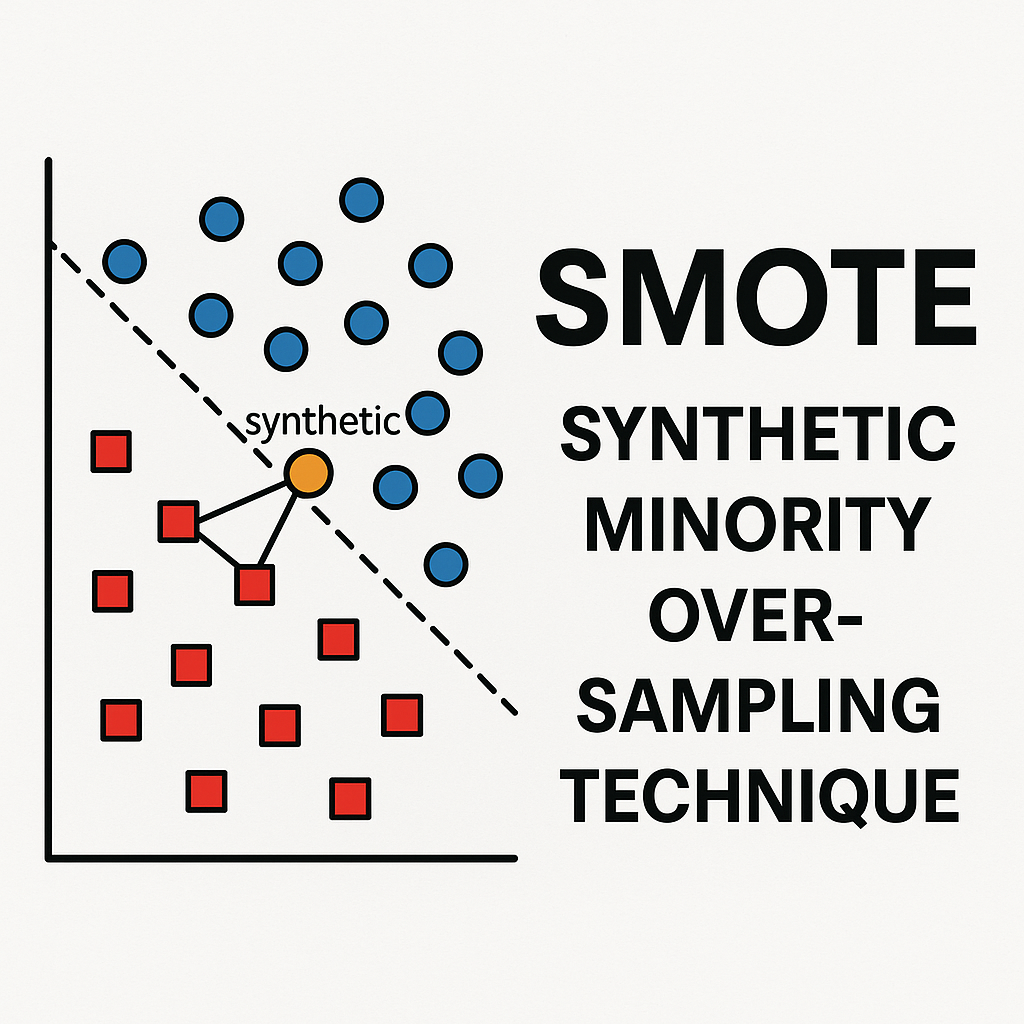
We’ll be using the encoded data to generate a total of 521,943 observations of non-payers. This number exceeds the total number of payers in the original data by 10%. We create more synthetic data than we will actually use to account for instances where SMOTE might create data that it’s too similar to the original data.
# separate features and labels (outcome)
X = data_encoded.drop('loan_paid_back', axis=1)
y = data_encoded['loan_paid_back']

# count numbers in each class
n_non_payers = np.sum(y == 0)
n_payers = np.sum(y == 1)

# number of samples to generate to balance classes (i.e., 10% over the total number of payers)
n_samples_to_generate = int((n_payers*1.1).round())
Disclaimer: Even though I will keep making a distinction between ‘real’ and synthetic data, we know from Kaggle that the initial data we used was generated synthetically. This means we’re actually generating synthetic data out of synthetic data.
Before we use SMOTE, we’ll turn all variables in the training data to floating digits. SMOTE will then create the total number of data observations needed to balance the number of payer and non-payers. This means the data we get back is the original training data plus the synthetic data.
# turn all train to float before SMOTE
X = X.astype('float')

# apply SMOTE
X_smote, y_smote = SMOTE(
    sampling_strategy={0:n_samples_to_generate, 1:n_payers}
    ).fit_resample(X, y)

# this shows us the new distribution of classes in the training set after SMOTE
# remember we have 10% more non-payers than payers as we haven't checked for similarities
# between synthetic and original data points
y_smote.value_counts()
loan_paid_back
0.0    521943
1.0    474494
Name: count, dtype: int64
Re-processing after SMOTE
The data returned by SMOTE is in the form of floating digits. Although expected, this means we’ll need to re-process the data so variables are in the same format as in the original data_encoded object. You can see in the last 10 rows of the new data frame, which represent examples of synthetic data, that variables such as credit_score and grade_subgrade are no longer integers. Similarly, variables that were one-hot encoded such as gender and marital_status lost their encoding (i.e., there are values between 0 and 1 across all columns).
# this shows why we need to do further processing
X_smote.filter(regex='credit_score|grade_subgrade|marital_status').tail(10)
| credit_score | grade_subgrade | marital_status_Divorced | marital_status_Married | marital_status_Single | marital_status_Widowed | |
|---|---|---|---|---|---|---|
| 996427 | 679.392626 | 12.568590 | 0.392147 | 0.607853 | 0.000000 | 0.0 |
| 996428 | 643.754426 | 18.268355 | 0.000000 | 0.731645 | 0.268355 | 0.0 |
| 996429 | 723.635048 | 13.090721 | 0.000000 | 0.909279 | 0.090721 | 0.0 |
| 996430 | 644.942323 | 16.971162 | 0.000000 | 0.676279 | 0.323721 | 0.0 |
| 996431 | 699.541211 | 14.951032 | 0.000000 | 1.000000 | 0.000000 | 0.0 |
| 996432 | 692.996202 | 12.996202 | 0.998101 | 0.001899 | 0.000000 | 0.0 |
| 996433 | 623.517978 | 21.562367 | 0.000000 | 0.359408 | 0.640592 | 0.0 |
| 996434 | 623.147296 | 17.770541 | 0.000000 | 0.409820 | 0.590180 | 0.0 |
| 996435 | 674.313383 | 14.358216 | 0.000000 | 0.000000 | 1.000000 | 0.0 |
| 996436 | 700.299971 | 11.194738 | 0.000000 | 1.000000 | 0.000000 | 0.0 |
We will identify the original variable types from the original data and re-process accordingly.
# identify all data types
X = data_encoded.drop('loan_paid_back', axis=1)
print(X.dtypes.unique())

# create objects containing variable names by type
col_names = X.columns
type(col_names)
# create filters based on type
mask_float = X.dtypes == 'float64'
# get names of float columns
float_cols = col_names[mask_float]
# repeat for integer and boolean
mask_int = X.dtypes == 'int64'
int_cols = col_names[mask_int]
mask_bool = X.dtypes == 'bool'
bool_cols = col_names[mask_bool]
[dtype('float64') dtype('int64') dtype('bool')]
Then we create a function to replicate one-hot encoding. This function will take a group of variables that share a common name and it will examine every row to find which column was assigned the highest value by SMOTE. The value for that column will be replaced with a 1 and the rest will be replaced with zeros. This is done to reflect that, for example, a person in the data set cannot be both married AND single.
# function to perform one-hot encoding on boolean columns

def cast_one_hot_encoding(df, col_pattern):
    """
    transforms selected columns into one-hot encoded columns
    by setting 1 for the highest value and 0 for the rest.
    """
    # Filter columns that match col_pattern
    filtered_cols = [col for col in df.columns if col_pattern in col]

    print(f'These variables were identified based on the pattern provided:\n {filtered_cols} \n')

    # Find the index of the maximum value for each row across the filtered columns
    max_idx = df[filtered_cols].idxmax(axis=1)

    # create an array of zeros with the same shape as the filtered columns
    zeros_array = np.zeros_like(df[filtered_cols], dtype=int)

    # map column names by assigning indices
    col_index_map = {col: idx for idx, col in enumerate(filtered_cols)}
    max_idx_int = max_idx.map(col_index_map)

    # replace one of the zeros in the array with a 1 at the position of the maximum value
    zeros_array[np.arange(len(df)), max_idx_int] = 1
    # this is now the encoded array
    encoded_array = zeros_array

    # replace the original columns with one-hot encoded values
    df[filtered_cols] = encoded_array

    # turn boolean
    df[filtered_cols] =  df[filtered_cols].astype('bool')

    return df

patterns = ['gender', 'marital_status', 'education_level', 'employment_status', 'loan_purpose']

# now loop through boolean columns and apply the one-hot encoding function
for pattern in patterns:
    X_smote_processed = cast_one_hot_encoding(X_smote, pattern)
These variables were identified based on the pattern provided:
 ['gender_Female', 'gender_Male', 'gender_Other']

These variables were identified based on the pattern provided:
 ['marital_status_Divorced', 'marital_status_Married', 'marital_status_Single', 'marital_status_Widowed']

These variables were identified based on the pattern provided:
 ["education_level_Bachelor's", 'education_level_High School', "education_level_Master's", 'education_level_Other', 'education_level_PhD']

These variables were identified based on the pattern provided:
 ['employment_status_Employed', 'employment_status_Retired', 'employment_status_Self-employed', 'employment_status_Student', 'employment_status_Unemployed']

These variables were identified based on the pattern provided:
 ['loan_purpose_Business', 'loan_purpose_Car', 'loan_purpose_Debt consolidation', 'loan_purpose_Education', 'loan_purpose_Home', 'loan_purpose_Medical', 'loan_purpose_Other', 'loan_purpose_Vacation']
After saving the results of one-hot encoding in a new data object, you can loop again through the remaining columns to restore floating and integer columns. Notice the new format of the synthetic data.
# use another loop to set types to float and integer columns
for col in col_names:
    if col in float_cols:
        # keep float type as is but round to 2 decimals to as in real data
        X_smote_processed[col] = X_smote_processed[col].round(2).astype(float)
    elif col in int_cols:
        # round integers
        X_smote_processed[col] = X_smote_processed[col].round()

# have a look at the processed data (just a couple of cols to check the changes)
X_smote_processed.filter(regex='credit_score|grade_subgrade|marital_status').tail(10)
| credit_score | grade_subgrade | marital_status_Divorced | marital_status_Married | marital_status_Single | marital_status_Widowed | |
|---|---|---|---|---|---|---|
| 996427 | 698.0 | 10.0 | False | False | True | False |
| 996428 | 651.0 | 17.0 | False | False | True | False |
| 996429 | 612.0 | 16.0 | False | False | True | False |
| 996430 | 577.0 | 27.0 | False | False | True | False |
| 996431 | 667.0 | 17.0 | False | True | False | False |
| 996432 | 740.0 | 8.0 | False | True | False | False |
| 996433 | 555.0 | 27.0 | False | False | True | False |
| 996434 | 688.0 | 15.0 | False | True | False | False |
| 996435 | 690.0 | 15.0 | False | False | False | True |
| 996436 | 646.0 | 14.0 | False | True | False | False |
De-duplicating the synthetic data
We will be checking the synthetic data for potential duplication and close similarity to real data. SMOTE returned the original data and topped it up by adding the synthetic data points, so we can separate the real data from the synthetic data like so:
# separate original from synthetic data
# use copy() to avoid SettingWithCopyWarning
X_synthetic = X_smote_processed[len(X):].copy()
y_synthetic = y_smote[len(y):].copy()

# this tells us the amount of synthetic data generated for each class
# reminder: we did not generate synthetic data for the majority class (payers)
y_synthetic.value_counts()
loan_paid_back
0.0    402443
Name: count, dtype: int64
To de-duplicate the synthetic data, we standardise it and compare it to the standardised version of the original data. I’ll explain why standardsisation is needed for modelling in the next article, but for now it will suffice to note that after standardisation, the mean of our numeric data will be 0 and the standard deviation will be 1. You can mak a function to standardise data like the one below and re-use it for modelling.
from sklearn.preprocessing import StandardScaler

# function to standardise data (mean = 0, stdev = 1)
def standardise_data(X_train, X_test):
    # intialise scaling object
    sc = StandardScaler()
    # set on the training set
    sc.fit(X_train)
    # apply scaler
    train_std = sc.fit_transform(X_train)
    test_std = sc.fit_transform(X_test)
    return train_std, test_std

X_real_std, X_synthetic_std = standardise_data(X, X_synthetic)
The actual metric used for de-duplication will be the distance from the synthetic data point to the nearest neighbour in the real data. The block below shows how to calculate it.
# below takes a couple of minutes to run
# find nearest neighbour in the real data for each synthetic data point
nn = NearestNeighbors(n_neighbors=1, algorithm='auto').fit(X_real_std)
dists, idxs = nn.kneighbors(X_synthetic_std)


# store the distances and indices of nearest neighbours
X_synthetic['nearest_neighbour_distance'] = list(dists.flatten())
X_synthetic['nearest_neighbour_index_real_data'] = list(idxs.flatten())
Now that we have the nearest neighbour distances stored in the synthetic data, we can check what proportion is virtually identical to the real data.
identical = X_synthetic['nearest_neighbour_distance'] < 0.001

print (f"Proportion of data points identical to real data points =",
       f"{identical.mean():0.3f}")
Proportion of data points identical to real data points = 0.000
Since none of the synthetic data was identical to the real data, we’ll proceed to make a data frame that has all the synthetic features and labels.
# make data frame of all synthetic data (features and labels)
data_synthetic = pd.concat([X_synthetic, y_synthetic], axis=1)
You can sort the synthetic data by furthest neighbouring distance from the real data.
# sort by furthest distance to nearest neighbour in real data
data_synthetic.sort_values(by='nearest_neighbour_distance',
                                 ascending=False, inplace=True)
data_synthetic['nearest_neighbour_distance'].head()
897188    45.096394
599661    45.089614
621848    45.087805
954039    45.081490
745856    45.079437
Name: nearest_neighbour_distance, dtype: float64
Since we have excess synthetic data, we can remove the 10% that was most similar to the real data. We can also create a column in the synthetic data to identify it as such.
# this is the number of synthetic, non-payer data points needed to balance the classes
n_remain = n_payers-n_non_payers

# remove synthetic data points based on proximity to real data points
data_train_synthetic_final = data_synthetic.head(n_remain).copy()
data_train_synthetic_final['loan_paid_back'].value_counts()
# create synthetic data flag
data_train_synthetic_final['is_synthetic'] = True
Save synthetic data for modelling
Now that we have cleansed synthetic data, we can add it back to the original train data to create a data set where both the number of payers and non-payers is the same. You can save that data locally to use in future models.
# start by bringing together the original training data
data_training_after_smote = data_encoded.copy()
# add column to identify synthetic vs real data
# set to false for all original data points
data_training_after_smote['is_synthetic'] = False
# add synthetic data to original training data
data_training_after_smote = pd.concat([data_training_after_smote, data_train_synthetic_final], axis=0)
print(data_training_after_smote['loan_paid_back'].value_counts())

# write to csv for use in modelling
data_training_after_smote.to_csv('./data/data_processed_after_smote.csv', index=False)
loan_paid_back
1.0    474494
0.0    474494
Name: count, dtype: int64
Next, I will fit a logsitic regression and do a bit of model evaluation to obtain baseline measures that can later be compared against other ML methods. I will be experimenting fitting models with the original and the augmented data just created.